
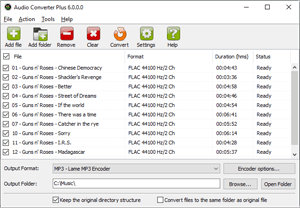

Audio Converter Plus
Abyssmedia Audio Converter Plus is a powerful, professional solution designed for transcoding the most popular audio formats and Audio CD tracks directly to MP3, M4A, WMA, OGG, AMR, FLAC, APE or WAV formats. High-quality 32-bit converter engine guarantees performance boost on multi-core CPU and allows precision sample rate conversion. Converter can process 24-bit and 32-bit WAV files for DVD Audio mastering. Integration with Windows Explorer enables easy conversion of entire folders. Just add audio files, select output folder and format and you are ready to convert with a single click.
Free Trial[Windows] Buy NowAudio Converter Plus
Unmatched performance
Since the converter is designed to handle large sets of audio tracks, the speed is critically important. We carefully optimized it to work on the newest processors from Intel and AMD. The converter uses SIMD instruction sets, such as SSE3. Sound processing is divided into several parallel tasks, which allows you to get a performance gain on multi-core processors. Of course, all operations are performed without creating temporary files, as is done in many free converters.
Designed for Huge Audio Collections
Not every converter can process tens of thousands of songs in one pass, but not Audio Converter Plus. You can specify the root folder of your audio collection and the converter will scan all subfolders for supported audio files and playlists. Audio files can also be added from the Windows Explorer context menu or using Drag'n'drop.
Audio DSP
The heart of the converter is a high-quality DSP module that processes audio with 32-bit precision. It allows you to change the sampling frequency in a wide range, from 8000Hz to 96KHz. Audio DSP supports 8 bit, 16 bit and 24 bit audio resolution, as well as 32-bit floating point samples. In addition, it can analyze the volume level and perform normalization of the sound so that all your songs sound at the same volume.
Transferring Audio tags
The converter supports most modern metadata formats in audio files, such as ID3, APE tag, MP4 tags, WMA tags, Vorbis Comments. Tags for CD tracks are loaded automatically from GnuDB. After converting, all tags will be transferred to the output file.
Keep the directory structure
By default, the files are saved in the specified directory or in the directory where the source file is located, but the converter can determine the root folder and recreate the directory tree in the new location.
Batch Processing
No matter what format the original files have, now it's not your concern. The converter will automatically change the sampling rate, audio resolution, audio tag format and volume level according to the selected output format. If you want to leave some parameters unchanged, then select the option "Same as original" in the codec settings.
Add-ons
The converter is integrated with our other products. You can set them up and run directly from the Tools menu to record audio, edit music, edit tags or find the tempo of a musical composition.
Typical applications
- Convert GSM to WAV to use them with Asterisk
- Convert FLAC to MP3 to reduce the disk space usage
- Decoding QCP ringtones to MP3 for smartphones
- Convert AIFF to MP3 if you need to use AIFF audio files from Mac
- Handy way to convert DSD to FLAC
- Here's a quick way to convert an Opus to MP3
- Convert APE to FLAC without loss
Specifications
| Supported OS | Windows 7, Windows 8, Windows 8.1, Windows 10 |
| Input audio formats | MPEG Audio (MP3, MP4, M4A, MP2), Windows Media Audio (WMA), OGG Vorbis (OGG), Monkey's Audio (APE, MAC), FLAC Audio (FLAC), MusePack (MPC, MPP, MP+), NTT TwinVQ (VQF), WAV PCM Audio (WAV), Portable Voice Format (PVF), Creative VOC (VOC), Commodore Amiga Audio (IFF, SVX), Sun/Next SND (SND, AU), AIFF (AIFF), WavPack Files (WV), Speex (SPX), CRI ADX (ADX), TrueAudio (TTA), OptimFrog (OFR), Advanced Audio Coding (AAC), GSM Audio (GSM), Apple CAF (CAF), 3GPP (3gp, 3g2), ShockWave Flash (FLV, SWF), Sierra SOL (SOL), RK Audio (RKA), DFPWM1a (DFPWM), Binary Cafe Stream (VFSTM), Binary Revolution Stream (BRSTM), Yamaha SMAF (MMF), Sony OpenMG (OMA), Microsoft XMV (XMV), MD STUDIO audio (AEA), Ensoniq Paris Audio (PAF), Audio CD Tracks (CDA), OGG Opus (OPUS), Apple Lossless Audio Codec (ALAC), Adaptive Multi-Rate audio (AMR), Sony Wave64 (W64), IRCAM Soundfile (IRCAM), Tracker Music (MOD, XM, IT, S3M), Direct Stream Digital (DSF, DFF), Digital Speech Standard (DSS), Qualcomm PureVoice (QCP), Signed Linear PCM format from Asterisk (SLN), Internet Low Bitrate Codec (ILBC), Tom's lossless Audio Kompressor (TAK), RealAudio (RA, RM). |
| Output audio formats | MP3, M4A, WMA, OGG, AMR, FLAC, APE, WAV, GSM, AIFF, ALAC, OPUS, WavPack, USAC |